

WIS2 in a box Newsletter (2026-No.2)
WIS2 in a box 1.3.0 Released
New to wis2box ? Please check out the the WIS2 in a box landing page in the Knowledge Hub
- News was produced by:
- World Meteorological Organization (WMO)
WIS2 in a box 1.3.0 Released
We are pleased to announce the release of wis2box version 1.3.0.
All users are strongly encouraged to upgrade to wis2box 1.3.0 to benefit from the latest features, bug-fixes and security updates.
This Newsletter highlights key updates made for this release.
🪣MinIO-storage provided by the wis2box-team
The MinIO project (https://github.com/minio/minio) was archived by its provider on Apr 25, 2026. To ensure wis2box users can continue to benefit from free S3-compatible object storage, the wis2box team now maintains a detached fork of MinIO in the WMO GitHub repository.
The new wis2box-minio repository can be found here:
https://github.com/world-Meteorological-Organization/wis2box-minio
The wis2box team therefore assumes responsibility for keeping this project up-to-date and to provide regular security-updates based on daily Trivy vulnerability scans. The Docker images for wis2box-minio are available for download from: https://github.com/World-Meteorological-Organization/wis2box-minio/pkgs/container/wis2box-minio
Please note that wis2box-minio uses the AGPL-3.0 license to match the license of the original source-code.
📥WIS2 Downloader now provided as a separate project
The wis2downloader project originally included as part of wis2box has been removed. The download functionality is now provided by a new repository:
https://github.com/World-Meteorological-Organization/wis2downloader
The Docker stack provided by this repository should be installed on a separate instance from the one hosting wis2box. Note that to download data from WIS2, you do not need a server for which HTTP traffic is routed to the public Internet.
For more information please see the documentation provided at:
https://world-meteorological-organization.github.io/wis2downloader/
⚙️New csv2bufr templates available
This wis2box-release includes version 0.6 of csv2bufr-templates, adding new csv2bufr-templates to support data ingestion using SURFACE CDMS and Climsoft.
You will find the new default templates listed in the dropdown of the dataset editor when configuring the csv2bufr-plugin :
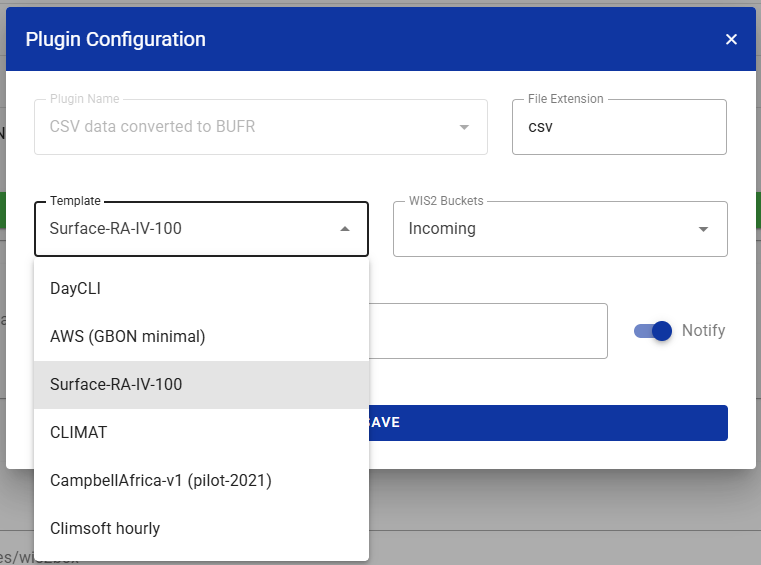
These templates represent the defuault csv2bufr-templates included with the wis2box-release. As before, user can create their own custom csv2bufr-templates on their local wis2box-instance as required.
📋Updated documentation on data ingestion options
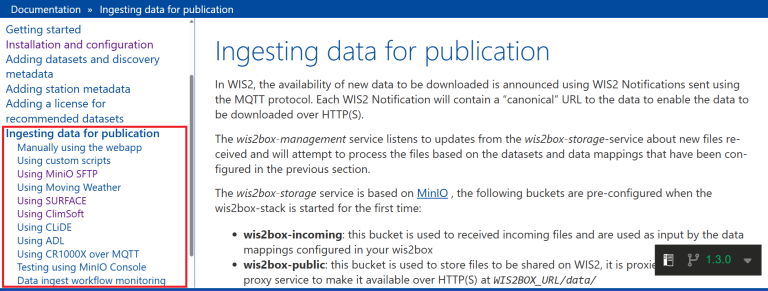
The documentation for wis2box has been updated for commonly used data ingestion options such as Moving Weather, SURFACE, Climsoft, CliDE and ADL. Third-party software providers wishing to add new or updated instructions in this section are invited to open an issue in the wis2box issue tracker
🔐Easy-to-use option to add Traefik to the wis2box-stack
In order to enable any wis2box user to use SSL encryption, the wis2box release archive now includes an additional Docker Compose file to easily add a Traefik reverse proxy that automatically provisions and renews SSL certificates using Let’s Encrypt.
To enable Traefik, edit the WIS2BOX_URL and WIS2BOX_API_URL environment variable in wis2box.env to replace http:// with https://, replace the override-definition and restart the wis2box-stack using the following commands:
sed -i 's|WIS2BOX_URL=http://|WIS2BOX_URL=https://|g' wis2box.env
sed -i 's|WIS2BOX_API_URL=http://|WIS2BOX_API_URL=https://|g' wis2box.env
cp docker-compose.traefik.yml docker-compose.override.yml
python3 wis2box-ctl.py restart
After the Traefik proxy is enabled, all wis2box public services are available over https://
Note that this will also enable MQTT subscriptions over secure WebSockets on the wis2box-broker at wss://<WIS2BOX_URL>/mqtt.
If your WIS2 Node is currently registered on the WIS2 network using port 1883 and you wish to update your registration to use MQTT over secure WebSockets, please contact WMO Secretariat at wis2-support wmo [dot] int (wis2-support[at]wmo[dot]int).
🏷️Metadata Control File (MCF) version 2.0
For wis2box users using MCF files to publish discovery metadata, the format of these files has changed (MCF version 1.0 is no longer supported).
To upgrade your existing MCF files to the MCF 2.0 format, perform the following updates:
- Move content in identification.dates to metadata.dates
- Change the value of mcf.version from 1.0 to 2.0
Example:
mcf:
version: 2.0
metadata:
identifier: urn:wmo:md:dz-meteoalgerie:surface-weather-observations
hierarchylevel: dataset
dates:
creation: 2026-06-22
✅Bug fixes and other improvements
- Update to use pygeoapi 0.23.3 which resolves several frontend issues relating to API query result depending on order of parameters, see pygeoapi-issue 2189
- Avoid crash in "wis2box-api clean" when cleaning a large number of records in Elasticsearch
- Add option to add GTS headers when using the FM-12 SYNOP Form
- Avoid warnings being returned from another csv2bufr process in the same python-thread
- Updates related to BUFR encoding, now using ecCodes-2.47, synop2bufr-0.8.0 and csv2bufr-0.8.8
- Force reinstall numpy to older version to avoid compatibility issues on certain systems
- Additional checks in the wis2box-webapp station editor and import form to avoid the input of invalid values
- Fix dataset map on wis2box homepage not updating after filtering
ℹ️Update instructions and additional information
For more information including update instructions, please check out the Release notes for wis2box 1.3.0 on GitHub
WMO is committed to continuously supporting WIS2 in a box. We are actively working on new features, bugfixes and compliance updates based on your feedback.
Please report any issues or requests for improvements on the wis2box issue tracker on GitHub.
We hope wis2box 1.3.0 will continue to contribute to exchanging WMO data within the WIS2 framework more securely and efficiently!